
Aqara Smart Lock U100: Complete Guide to Features, Installation & Smart Home Integration
The Aqara Smart Lock U100 can turn a standard front door into a powerful security and automation hub for your home.
With more than a thousand sold from Amazon’s storefront and strong reviews from smart home communities, this lock combines modern convenience with robust security measures you can count on.
Built-in fingerprint access, Apple Home Key support, and broad compatibility with major ecosystems make it appealing for daily use and smart automation.
At typical prices ranging from about $189.99 on Best Buy to similar Amazon listings, it sits in the mid-range for feature set and performance among smart locks today.
Here’s a friendly and useful set of insights to help you understand how it works, what it supports, and whether it fits your front door. Let’s dive into the details.
What Is the Aqara Smart Lock U100?
The Aqara Smart Lock U100 is a keyless entry deadbolt that blends physical durability with smart features suited for modern homes.
It’s designed to replace a standard deadbolt on exterior doors, adding digital convenience without compromising security. At its core, the lock supports multiple access methods and smart home integrations for flexible use.
Key Specifications and Real-World Details
Strong Build and Weather Resistance
The lock body is made from zinc alloy and carries an IPw65 weatherproof rating to handle dust, rain, and outdoor conditions. This means it withstands daily exposure without performance issues.
Unlocking Options for Daily Use
Multiple access methods give you choice and flexibility:
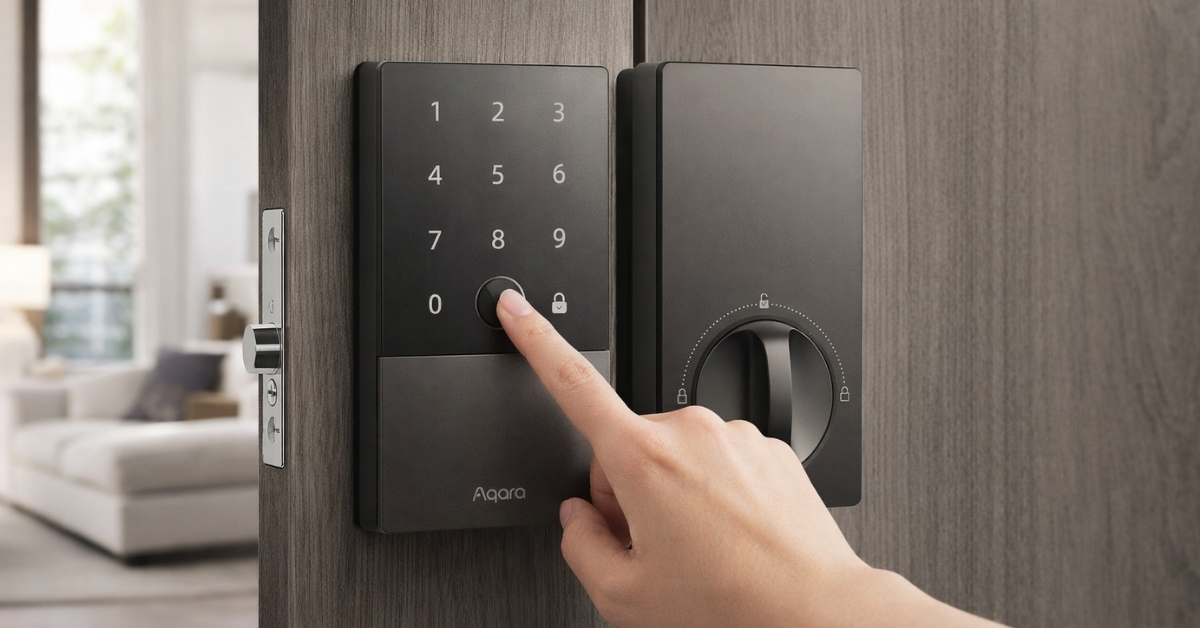
- High-precision fingerprint reader – stores many unique prints and unlocks fast.
- Touchscreen keypad with anti-peep support for easier PIN entry.
- Apple Home Key access – tap your iPhone or Apple Watch, even if the device is low on power.
- Mechanical key – fits into the standard keyhole for emergencies.
- Bluetooth app unlock through the Aqara Home app.
This range of access methods makes the U100 a strong performer in the smart lock U100 review category.
Encryption and Smart Home Data
All digital communication uses 128-bit encryption, with fingerprints and PIN data stored locally on the device rather than in the cloud, which helps protect privacy and reduce external security risks.
Smart Home Integration and Connectivity
The U100 doesn’t just unlock doors—it becomes part of a broader smart home setup.
Apple Home and Apple Home Key
Native support for Apple HomeKit and Apple Home Key means iPhone and Apple Watch users can unlock with a tap and manage access through the Home app.
This is one of the most seamless experiences in the Apple Home Key smart lock space.
Zigbee and Multi-Platform Compatibility
With a Zigbee connection (requires a compatible hub), the lock integrates with:
- Google Home
- Amazon Alexa
- IFTTT
- Aqara Home automation scenarios
This makes it suitable for mixed ecosystems and smart routines.
Future-Ready and Matter Support
When paired with an appropriate hub, the lock supports the Matter standard—making it more future-proof and easier to use in cross-platform automation.
Installation and Compatibility
The Aqara Smart Lock U100 is built to retrofit into standard US deadbolt setups:
- Door thickness: 1-3/8″ to 2-11/64″
- Backset range: 2-3/8″ or 2-3/4″
- Hole diameter: 2-1/8″
Most tools needed for install are included, and many people report completing the process in about 30–45 minutes with basic tools. That makes it a strong choice in the Aqara U100 installation guide context for DIY enthusiasts.
Managing Access and User Controls
The Aqara Home app gives you a practical way to manage users and codes:
- Create temporary codes for guests or service workers.
- Share access through the Apple Home app to designated devices.
- Track entries and events in an activity log.
Someone handling rentals or frequent guests will appreciate this flexibility.
Power and Backup Options
The U100 is powered by four AA batteries included in the box. Battery life generally lasts about 8 months under normal use.
If the batteries run out, there’s a USB-C emergency power port where you can give it temporary power from a power bank. A traditional mechanical key is always available as a fallback.
Price and Value Comparison
Typical listings for the lock alone hover around $189.99 at Best Buy, though occasional Amazon deals have dropped prices significantly.
Considering its feature set—fingerprint access, Apple Home Key support, keypad, and smart home compatibility.
It lands favorably when compared to other mid-range locks that may offer fewer methods or limited ecosystem support. For many, this balance makes it a strong pick among best smart lock for home options.
Pros and Cons Based on Real Usage
Advantages
- Flexible access options for different users and scenarios.
- Excellent integration with Apple ecosystem products.
- Durable build and weather resistance suitable for exterior doors.
- Broad smart home compatibility once paired with a hub.
Limitations
- Full remote control and advanced automations require a hub, which adds cost.
- Setup can be technical for beginners unfamiliar with Zigbee.
- NFC accessory tags aren’t always included.
- Price sits above basic smart lock options.
Real-World Performance and Feedback
Fingerprint reader performance is consistent in most conditions, though extreme cold can slow recognition slightly—a common observation with biometric sensors.
Bluetooth range is generally dependable for typical front porch distances, and the Aqara Home app usually responds promptly for local control. Connectivity to other platforms sometimes depends on the hub and setup method.
Battery life numbers typically land close to the manufacturer’s estimate when activity levels are average.
Handling Objections and Expectations
Concern: “What if my phone isn’t nearby?”
Mechanical keys and emergency power mean you can still get in even if your phone is out of range or has a dead battery.
Concern: “Is it harder to install than my old deadbolt?”
Follow instructions carefully for a smooth experience. If your door has unusual dimensions, a professional might be helpful.
Concern: “Do I need a hub?”
A hub isn’t required for Bluetooth access, fingerprint, or keypad unlocking. It is needed for remote access, Matter features, and broader automation.
Conclusion
For a front door upgrade that blends strong security with smart home flexibility, the Aqara Smart Lock U100 is a solid choice.
It earns its place with a variety of access methods, native Apple Home Key support, and broad smart ecosystem compatibility once connected through a hub.
If you enjoy convenient keyless entry, detailed user control, and integration with devices like your iPhone or voice assistant, exploring this lock further on Amazon will show current pricing and specific package options.
There are always more features to explore and ways to expand your smart home, so take the next step and check out real user feedback and live deals.