
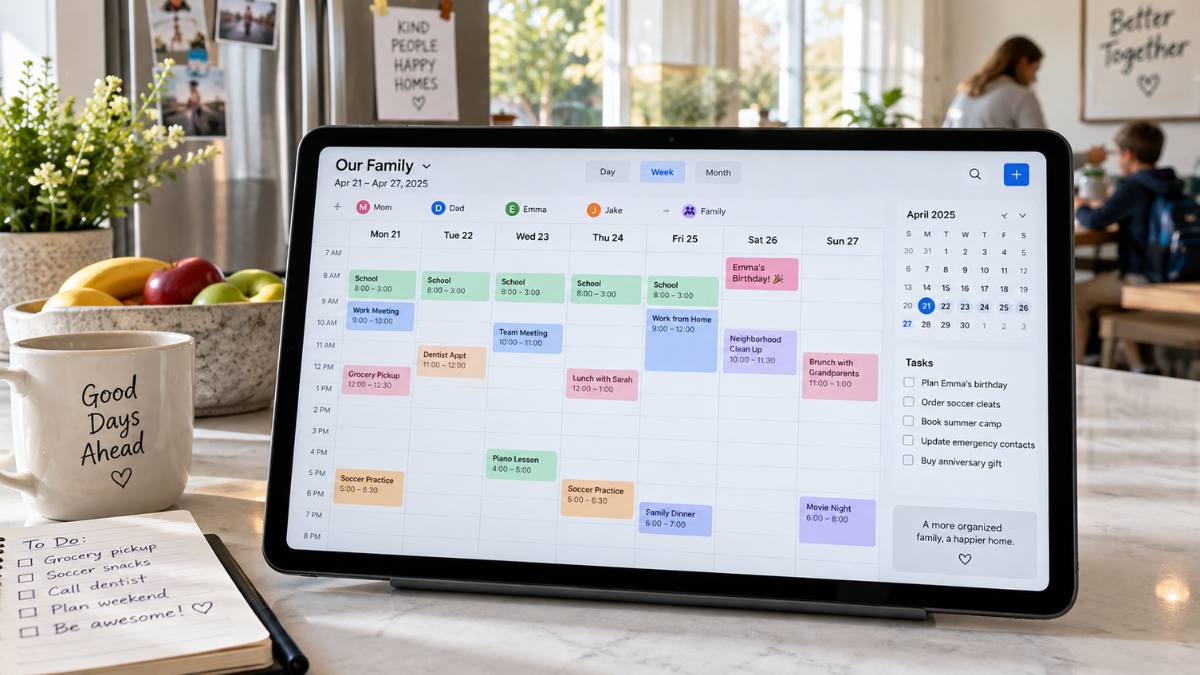
How a Digital Family Calendar Improves Communication Across Your Entire Household
A digital family calendar gives your household one convenient place to manage appointments, school activities, work schedules, chores, and family events. Each person can view upcoming plans without checking several apps, paper notes, or message threads.
Busy households often deal with overlapping commitments and last-minute changes. A shared calendar keeps everyone informed and reduces missed appointments.
What Is a Digital Family Calendar?
A digital family calendar is an electronic scheduling tool shared by members of the same household. It may appear on a smartphone, tablet, computer, smart display, or wall-mounted touchscreen.
Authorized family members can add, edit, and review events. Some calendars include chore lists, meal planning, grocery lists, weather updates, and personal task boards.
Unlike a paper calendar, a digital version can update instantly across connected devices. If an appointment changes, everyone with access can see the revised time.
Benefits of Using a Digital Family Calendar
Keeps Schedules in One Place
Family members often use separate planners, phone apps, and school schedules. This can make coordination difficult. A shared digital calendar combines important dates in one central location.
You can record:
- Medical and dental appointments
- School activities and deadlines
- Work shifts and meetings
- Sports practices and games
- Birthdays and celebrations
- Family outings
- Household maintenance
- Bill payment dates
This shared view helps prevent double bookings and forgotten commitments.
Sends Helpful Reminders
Automatic alerts can remind you about upcoming appointments or tasks. You may set notifications several days, hours, or minutes before an event.
For example, an alert can remind you about a school project deadline on Monday or a dental appointment on Friday. Recurring reminders are useful for weekly chores, medication schedules, and monthly payments.
Makes Changes Easy to Share
Plans can change quickly. A sports practice may be rescheduled, or a parent may need to work late. Updating the shared calendar allows other family members to see the change right away.
This feature reduces repeated messages and helps everyone adjust their schedules accordingly.
Encourages Shared Responsibility
A family calendar can help children learn time management and personal responsibility. Assigning age-appropriate chores, homework blocks, and activity reminders teaches them to check their own schedules.
Color coding can make assignments easy to recognize. Each person may receive a specific color for events and tasks.
Useful Features to Look For
Simple Calendar Display
Choose a calendar with daily, weekly, and monthly views. Clear text, readable colors, and simple controls can help family members use it regularly.
A crowded display may discourage younger children or older relatives. The best interface is easy to understand at a quick glance.
Multiple User Profiles
Individual profiles allow each family member to manage personal events while viewing the household schedule. Look for options that let you control editing permissions, especially when young children use the calendar.
Device Synchronization
Calendar synchronization keeps schedules updated across phones, tablets, computers, and smart displays. Compatibility with popular calendar services may help you import existing appointments instead of entering them again.
Custom Reminders
Different events need different alert times. A school deadline may require a reminder several days ahead, while a family dinner may need a same-day notification.
Select a calendar that supports adjustable alerts for each event.
Recurring Events
Recurring scheduling saves time when adding regular activities. You can create repeating entries for weekly sports practice, monthly bills, household cleaning, and annual birthdays.
Chore and Task Management
Some digital family calendars include task lists and chore tracking. Parents can assign responsibilities, set due dates, and mark completed tasks.
Certain systems include reward points or progress tracking, which may encourage children to finish their assigned duties.
Meal Planning and Grocery Lists
Meal-planning tools can help organize breakfasts, lunches, and dinners for the week. Shared grocery lists allow family members to add items as supplies run low.
Keeping meal plans beside the household schedule can help you choose quick meals on busy evenings.
How to Set Up Your Digital Family Calendar
Start by adding every family member and assigning each person a color. Use clear names for events so everyone understands what is happening.
Enter fixed commitments first, including work hours, school schedules, medical appointments, and regular activities. Add household tasks, meal plans, celebrations, and personal reminders afterward.
Create simple rules for calendar use. Family members should add events as soon as plans are confirmed and update them when details change. A brief weekly schedule check can help everyone prepare for upcoming commitments.
Place a wall-mounted display in a frequently used area, such as the kitchen or hallway. If you use a calendar app, make sure each authorized person has access on their preferred device.
Tips for Keeping the Calendar Effective
A digital calendar works best when your household uses it consistently. Avoid adding unnecessary information that could make the schedule difficult to read.
Use short event titles and place addresses, contact numbers, or instructions in the event details. Set reminders carefully so frequent alerts do not become distracting.
Review access settings to protect personal information. Children may need viewing or limited editing permissions, while adults may need full access.
Update canceled events promptly. Old or incorrect entries can create confusion and reduce trust in the calendar.
Common Mistakes to Avoid
One common mistake is creating the calendar without explaining how each family member should use it. Clear household guidelines can prevent duplicate events and missing information.
Another problem is using too many colors or labels. Assign one color to each person and use separate labels only when necessary.
Do not rely entirely on notifications. Encourage family members to check the calendar each morning or evening. Regular viewing builds a dependable planning habit.
Choosing the Right Digital Family Calendar
Think about your household size, daily routines, preferred devices, and required features. A basic shared calendar app may suit a small household. A dedicated touchscreen display may work well for larger families managing numerous schedules and tasks.
Check compatibility with devices and calendar services already used in your home. Review privacy controls, subscription fees, screen size, storage limits, and offline access before choosing a system.
A free trial can help you test the controls and decide if the calendar fits your family’s routine.
Building Better Household Routines With a Digital Family Calendar
A digital family calendar can reduce scheduling confusion and improve communication throughout your household. Shared appointments, reminders, chore lists, and real-time updates help everyone stay informed.
Choose a system that is easy to access and simple to maintain. With regular use, your family can plan each week clearly, divide responsibilities fairly, and spend less time resolving schedule conflicts.