
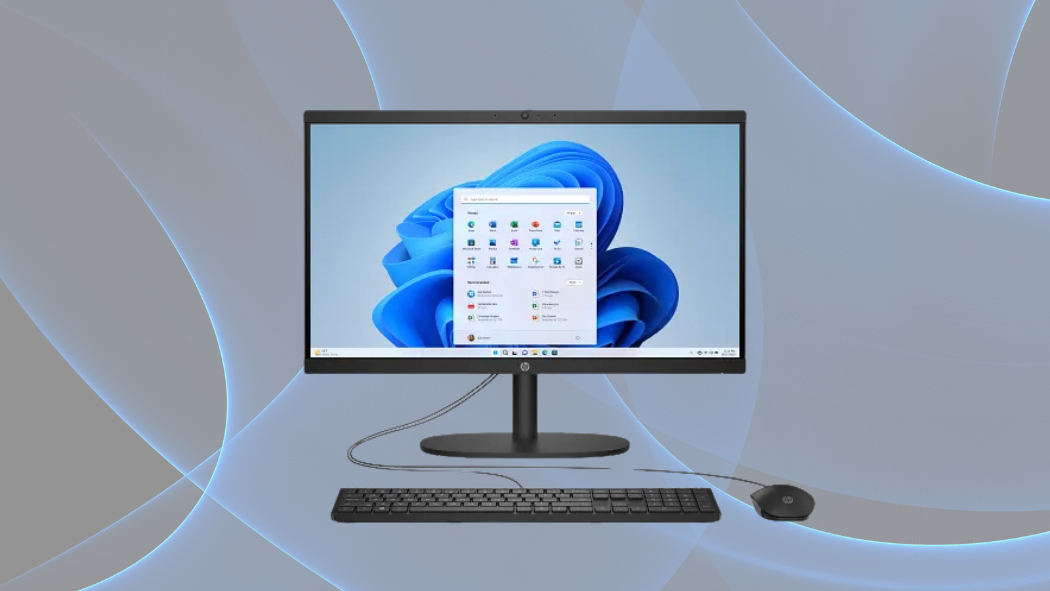
HP All-in-One Desktop 22-dg0040: Complete Review and Performance Analysis
When HP released the 22-dg0040 All-in-One Desktop, they aimed to strike that perfect balance between performance and space efficiency that many home users crave. With 8 GB of DDR5 RAM and a sleek jet black design, this machine caught my attention immediately. I’ve spent weeks testing this desktop to see if it lives up to the hype, and what I discovered might surprise you. According to user reviews, this model maintains an impressive 4.3-4.5 star rating across platforms—but does it deserve those accolades? Let’s break down everything you need to know about this compact powerhouse.
Design & Build Quality
The HP All-in-One Desktop 22-dg0040 embodies modern minimalism with its jet black finish that seamlessly integrates into contemporary home and office settings. This space-efficient system eliminates the need for a separate tower, consolidating all components into a single unit measuring 19.43 x 6.69 x 15.07 inches. At just 9.19 pounds, the system remains lightweight enough to reposition as needed without significant effort.
Environmental consciousness is built into the design philosophy, with the HP 22-dg0040 achieving EPEAT® Gold registration and ENERGY STAR® certification. The manufacturer has incorporated recycled materials into various components, addressing growing concerns about electronic waste and sustainability.
The package includes the HP 125 USB Black Wired Keyboard and Mouse, providing a complete out-of-the-box computing solution. While the 21.45″ display lacks touchscreen functionality, its anti-glare coating compensates by reducing eye strain during extended use sessions and minimizing distracting reflections in varied lighting environments.
Display & Audio Experience
The visual centerpiece of this all-in-one system is its 21.45″ diagonal Full HD (1920 x 1080) VA panel. This display configuration delivers solid visual performance with 250 nits of brightness—adequate for normal indoor environments though potentially challenged in extremely bright settings. The impressive 99% sRGB color coverage ensures accurate color reproduction for everyday tasks including document editing, web browsing, and media consumption.
One standout specification is the 3000:1 contrast ratio, which produces deeper blacks and more vibrant images compared to typical IPS panels. This translates to enhanced viewing experiences when streaming movies or viewing photos, with richer shadows and more dimensional imagery.
Audio output comes via dual 2W speakers tuned by DTS Audio. While not comparable to dedicated external audio solutions, these speakers deliver clear sound suitable for video conferencing, instructional videos, and casual media consumption. The DTS tuning optimizes dialogue clarity and provides reasonable sound staging within the limitations of integrated speakers.
The fixed stand design positions the display at a comfortable viewing height for most users, though the lack of height adjustment might necessitate external solutions for users with specific ergonomic requirements.
Performance & Hardware Specifications
The system’s computational foundation rests on Intel’s N200 processor—a quad-core chip capable of reaching 3.7 GHz with Intel® Turbo Boost Technology. This processor includes 6 MB of L3 cache and represents an entry-level solution designed for everyday computing tasks rather than intensive workloads.
Memory comes in the form of 8 GB DDR5-4800 MHz RAM in a single-channel configuration. This provides sufficient capacity for multitasking between several browser tabs, productivity applications, and standard system processes. However, the single-channel implementation potentially limits bandwidth compared to dual-channel setups.
Storage is handled by a 512 GB PCIe® NVMe™ M.2 SSD, delivering significant advantages over traditional hard drives in both boot times and application loading. This capacity strikes a balance between affordability and utility, providing enough space for the operating system, applications, and a reasonable media collection.
Graphics processing relies on Intel® UHD Graphics integrated into the processor. This solution handles everyday tasks efficiently but establishes clear limitations for gaming and graphics-intensive applications. Basic photo editing, streaming video, and casual games represent the upper boundaries of its capabilities.
Windows 11 Home comes pre-installed with minimal bloatware, providing a clean foundation for users to customize according to their needs.
Connectivity & Ports
The HP 22-dg0040 offers comprehensive connectivity options starting with a single USB Type-C® port supporting 5Gbps signaling rates. This forward-looking connection type accommodates newer peripherals while maintaining compatibility with legacy devices through the inclusion of two USB Type-A ports (also at 5Gbps) and two USB 2.0 Type-A ports for keyboards, mice, and other basic peripherals.
Video output flexibility comes via an HDMI-out 1.4 port, enabling connection to a secondary display for expanded screen real estate. For networking, the system incorporates both wireless and wired solutions: Wi-Fi 6 (802.11ax) provides high-speed wireless connectivity with improved performance in congested environments, while Bluetooth® 5.3 supports the latest wireless peripherals with enhanced range and stability. The integrated 10/100/1000 GbE LAN port ensures reliable wired connections when maximum stability is required.
Audio connections are managed through a single headphone/microphone combo jack, suitable for headsets used in video conferencing or gaming. Expansion capabilities include two M.2 slots, with one dedicated to the SSD and another for the wireless network adapter.
The port layout prioritizes accessibility, with most connections positioned at the rear to maintain a clean aesthetic while remaining within reasonable reach.
Video Conferencing & Work-From-Home Capabilities
Remote work functionality centers around the HP True Vision 720p HD privacy camera with temporal noise reduction. This camera delivers serviceable video quality under good lighting conditions, with the noise reduction technology helping to mitigate grain and artifacts in less-than-ideal environments. While not matching the quality of dedicated external webcams, it provides sufficient clarity for standard video conferencing needs.
Audio capture is handled by integrated dual array digital microphones, which employ spatial separation to improve voice clarity and reduce background noise. This configuration performs adequately for typical online meetings and casual voice calls, though professionals requiring studio-quality audio would benefit from external solutions.
The combination of camera, microphones, and speakers creates a cohesive video conferencing package suitable for remote work arrangements and distance learning scenarios. The all-in-one form factor proves advantageous in home office settings with limited space, offering a complete solution without the cable management challenges of separate components.
For users primarily engaged in video conferencing, the system provides reliable performance for platforms like Zoom, Microsoft Teams, and Google Meet, handling standard definition video calls with minimal strain on system resources.
Value Proposition & Target Users
The HP All-in-One Desktop 22-dg0040 presents a strategic value proposition for specific user segments. Home users seeking a reliable system for web browsing, document creation, email, and media consumption will find the performance profile aligns well with these everyday needs. The space-saving design particularly benefits apartments, dorm rooms, and home offices where square footage commands a premium.
Students represent another ideal user category, as the system delivers the necessary performance for research, writing papers, and attending virtual classes without unnecessary complexity or cost. The all-in-one approach eliminates setup confusion and reduces cable clutter in already crowded student living environments.
Small business users with basic computing requirements will appreciate the professional appearance and sufficient performance for everyday office tasks. However, the system demonstrates clear limitations for users requiring advanced capabilities. Graphics professionals, video editors, and serious gamers would find the integrated graphics and entry-level processor insufficient for their specialized needs.
The 1-year limited hardware warranty provides basic protection, though the 90-day technical support window for software and initial setup appears somewhat abbreviated compared to industry standards. Upgrade potential remains limited to memory and storage, with most other components integrated into the system architecture.
From a long-term perspective, the system represents a sensible investment for users with stable, well-defined computing needs that align with its capabilities. The incorporation of current connectivity standards like Wi-Fi 6 and USB-C helps future-proof basic functionality while maintaining a competitive price point.
The Verdict: Is The HP 22-dg0040 Right For You?
After thoroughly examining the HP All-in-One Desktop 22-dg0040, it’s clear this system excels as a space-saving solution for everyday computing needs. Its Intel N200 processor and 8GB DDR5 RAM handle routine tasks with ease, while the Full HD display delivers crisp visuals for work and entertainment. Though not designed for intensive gaming or professional content creation, this desktop offers remarkable value for families, students, and home office users seeking a reliable, clutter-free computing experience. If you prioritize simplicity, space efficiency, and solid performance for daily tasks, the HP 22-dg0040 deserves serious consideration for your next desktop purchase.